


Selecting the advanced search icon  enables, on the results grid, the set of fields for which the different criteria can be selected to filter the form instances. Search criteria can be combined.
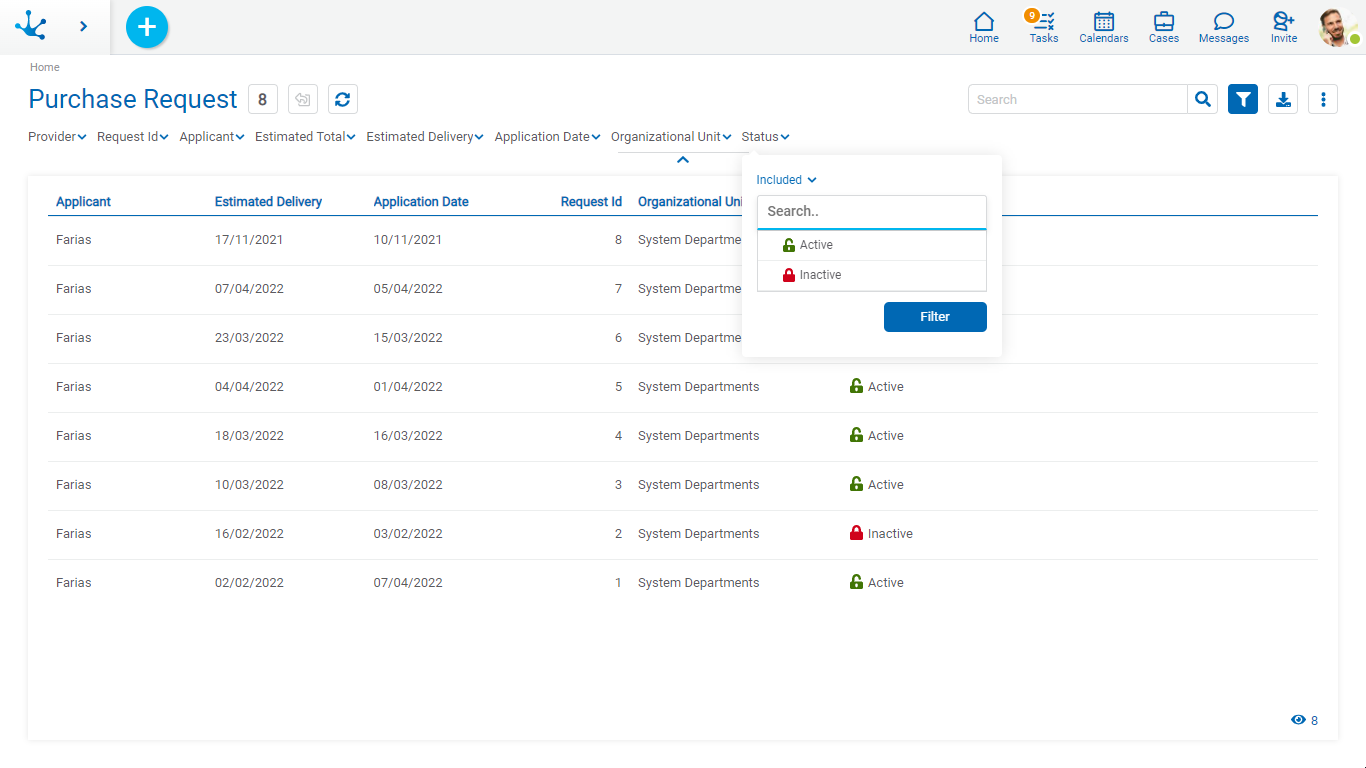
For each search criteria a value can be entered or selected from a list to be used as a filter.
All the necessary filters can be added, each time a filter is added a new search is automatically executed that updates the grid.
Filters applied in the search are highlighted where they were entered, followed by an icon  . Pressing this icon deletes the corresponding filter and automatically executes a new search that updates the grid.
 Expands the options bar, without updating the results in the grid.
 Hides the options bar, keeping the filters if any.
To delete all search filters, the advanced search icon should be clicked again. This reloads the entire list of instances into the grid.
Filters
Numeric Fields
The value entered should be numeric.
Search criteria:
•Greater than
•Greater equal to
•Less than
•Less equal to
•Between
•With Data
•No Data
Alphanumeric Fields
Enter a text to search for.
Search criteria:
•Contains
•Equal to
•Starts with
•Does not start with
•No Data
•With Data
Date Fields
Searches can be made using different search criteria.
Options:
•Today
•Last 7 days
•Current Month
•Current Year
•Last Month
•Last Year
•From (Requires selection of a start date)
•To (Requires selection of an end date)
•Range (Requires the selection of a start date and an end date)
•Equal (Requires selection of a date)
DateTime Fields
A calendar opens to select the date and time, it can be filtered using different search criteria.
•From
•Until
•Equal
•Range
Value Lists Fields
The list values and the corresponding icons are displayed, if the Icons property has been modeled..
Search criteria:
•Included
•Not Included
•With Data
•No Data